Access Totem

No badge. No tap. Just walk through.

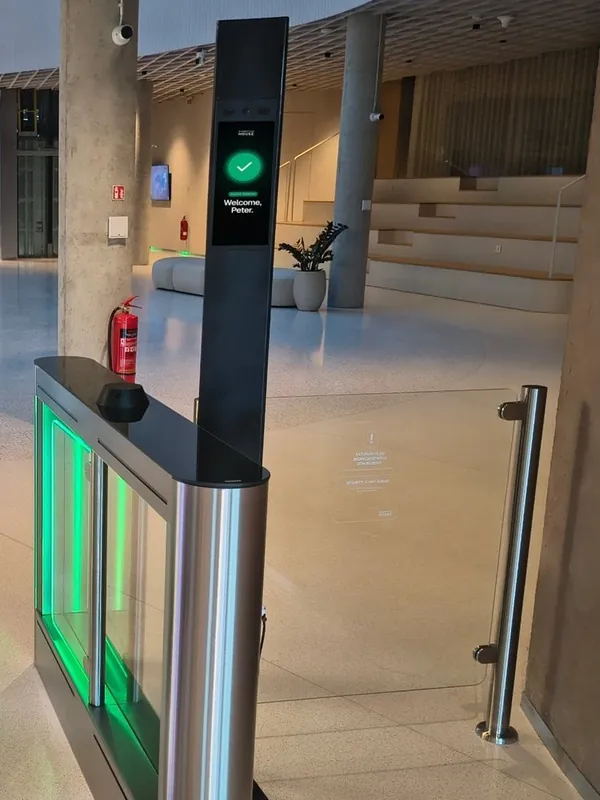
The Tricsy Access Totem stands beside your turnstile and recognises people by face as they approach. The display greets each person by name, so nobody has to stop at the gate. Without a turnstile, the same unit opens a door.
Ways in
3
Face · palm · QR
Displays
2
~12.9″ each
Footprint
160 mm
Triangle side
Access totem beside the speed gate at Biometrics House, its display showing Welcome, Peter
Access Totem Two-sided · ~12.9″ displays 1.8 m · free-standing
Beside the speed gate at Biometrics House, Bratislava.
For your visitors

Walk up, get greeted, walk through.

01

Walk up, walk through

The camera reads the face as the person approaches the gate. No card to tap — a palm or a QR code works too.

02

Greeted by name

A large display answers straight away. Green, with the person’s name, to go. Red to wait.

03

Works in both directions

One totem serves entry and exit, with a display and a camera on each of its two working faces.

On screen

“Welcome, Peter.” Green to go, red to wait.

The display greets every recognised person by name and tells them at once whether the gate will open — readable while they are still walking. Idle, granted and denied, all in the building’s own branding.

Top of the display frame: a camera between two speakers, above the screen
Camera between two speakers, above the screen.
Idle screen: Welcome. Look at the camera, or hold up your QR code.
Idle
Access granted screen: a green check and Welcome, Peter.
Granted
Access denied screen: a red cross and Please ask at reception.
Denied
How it works

From the Visitor Kiosk to the turnstile.

The totem is the next step after the Tricsy Visitor Kiosk: the face a guest checks in with there is the face that opens the gate.

  1. 01

    Check in

    The guest checks in at the Visitor Kiosk, and their face becomes their key for the visit.

  2. 02

    Approach

    At the turnstile, the totem’s camera meets the guest’s face almost head-on.

  3. 03

    Recognise

    The face is matched, and the access rights of the visit are checked.

  4. 04

    Walk through

    The display shows “Welcome” with the guest’s name, and the turnstile lets them pass.

For reception & security

Built to stand by the gate.

  • Completes the kiosk

    Guests checked in at the Visitor Kiosk are recognised here, at the turnstile — no extra step for them.

  • Aimed at the walker

    Each camera sits at ~30° to the lane, so it meets an approaching face almost head-on.

  • Slim and serviceable

    A 160 mm footprint keeps the lane clear; a rear hatch gives access to the electronics.

Front view of the access totem in the Biometrics House lobby: a display with a camera and two speakers above it
One working face: display, camera and speakers in a single frame.
In place

Beside the gate, or on it.

For a door without a turnstile, see the wall-mounted unit below.

Free-standing access totem beside a speed gate near the revolving entrance door of Biometrics House
Free-standingBeside the speed gate at Biometrics House, Bratislava.
Illustration of the totem mounted on a speed gate, one display facing the approaching guest
On the gateOne display faces the approaching guest.
Standalone at a door

No turnstile? Put it on the wall.

The totem’s unit — display, camera and speakers in one frame — also works on its own. Mounted beside a door, it recognises the person and the door opens.

  • Opens the door

    Through your access control system, such as Integriti or Nedap AEOS, through a 2N intercom, or through a network relay where a door has no access control.

  • On the wall or in it

    Surface-mounted, or set flush into the wall so nothing sticks out.

  • Same credentials, same greeting

    Face, palm or QR code, and the person’s name on the display — just like at the turnstile.
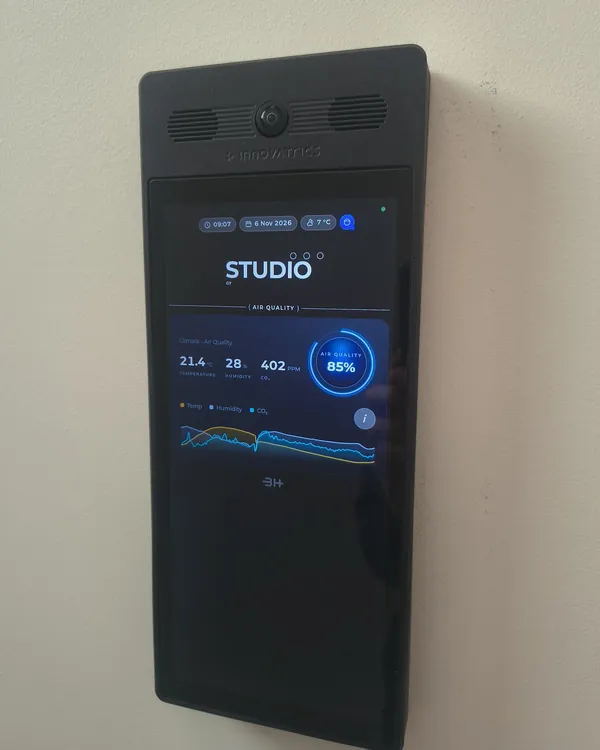
The same unit by a meeting-room door: Room Controller
Wall-mounted totem beside the door of the Studio room at Biometrics House; its screen shows the room name and the air quality
The totem that opens the Studio room at Biometrics House, Bratislava.
Specifications

Totem at a glance.

Display
2 × vertical LCD, 121 × 305 mm (~12.9″), one on each working face · frame 129 × 313 mm
Camera
Built into each display frame, 25 mm below its top edge · lens centre 1 650 mm above the floor
Credentials
Face · palm · QR code
Greeting
Name of the recognised person on the display
Coverage
Both walking directions · each face angled ~30° to the lane
Enclosure
Triangular, 160 mm sides (~139 mm deep), 1 800 mm tall · solid rear face
Base
5 mm steel base plate · cable gland with strain relief
Service
Rear hatch, at least 200 mm tall, from ~500 mm above the floor
Build
Powder-coated steel, black · indoor · 5-year warranty
Power & network
Ethernet · 2 × PoE+ or 100–230 V AC
Door control
Integriti · Nedap AEOS · 2N · network relays (dry contact)

Preliminary: dimensions and finish are subject to final engineering and may change before release.

Triangular access totem, 1 800 mm tall, with the camera lens at 1 650 mm
Form factors

One platform, four ways to stand.

Triangle access totem
01

Triangle

Two-sided: a slim triangular column, 160 mm per side, with a display and a camera on two faces, for lanes used in both directions. 1 800 mm tall.

Round access totem
02

Round

Two-sided: a display and a camera on two faces of a triangular head on a round column, for lanes used in both directions. 1 800 mm tall, Ø ~185 mm.

One-sided access totem
03

One-sided

A compact rectangular totem with a single display and camera, for lanes used in one direction.

Infinite access totem
04

Infinite

A rectangular column that runs from floor to ceiling, so the totem blends into the architecture. Suits a wall beside a door.

Illustrations not to scale. The specifications above describe the triangular totem.

Personal messages In development

Recognised means relevant.

Once the totem knows who is in front of it, the display will be able to show what is meant only for that person: their company’s invitation to an event, or a reminder that their meeting starts in two minutes on the 3rd floor, so they head straight there. Someone from another company at the same turnstile gets their own messages instead, while building-wide announcements, like a fire alarm test, reach everyone who walks in.

  • Building-wide announcements for everyone who walks in
  • Company messages shown only to the people they are meant for
  • One turnstile, a different message for each tenant
  • A heads-up to go straight to the next meeting
  • Driven by the same identity that opens the gate

An illustration of a feature in development. The people and companies are made up.

Company A Access granted Welcome, Anna. Thursday 16:00 Town hall in the atrium For Company A employees Whole building Fire alarm test, Tuesday 10:00
Anna works for Company A.
Company B Access granted Welcome, Martin. In 2 min Your meeting is on the 3rd floor Take the lift straight up Whole building Fire alarm test, Tuesday 10:00
Martin works for Company B: he sees his meeting, not the town hall.
Works with

Fits the access control you already run.

The totem adds the identity. Your access control system keeps the rules and opens the gate. A door can also open through a 2N intercom, or through a network relay where there is no access control.

  • Tricsy Visitor Kiosk
  • Sharry
  • Integriti
  • Nedap AEOS
  • 2N
  • Advantech
  • Dry contact

Recognition powered by Innovatrics.

Live in Bratislava

See it working at your turnstile.

Contact us to schedule a demo or discuss your building — or come and walk through it at Biometrics House.