Room Controller

The meeting room, at a glance and a tap.

The Tricsy Room Controller hangs beside the meeting-room door. It shows whether the room is free, books it in one tap, knows who is standing in front of it and runs the lights, blinds and shades — on the same identity as every other door in the building.
Book now
1 tap
15, 30 or 60 min
No-shows
Released
After a grace time you set
Recognition
On device
The panel sends no video
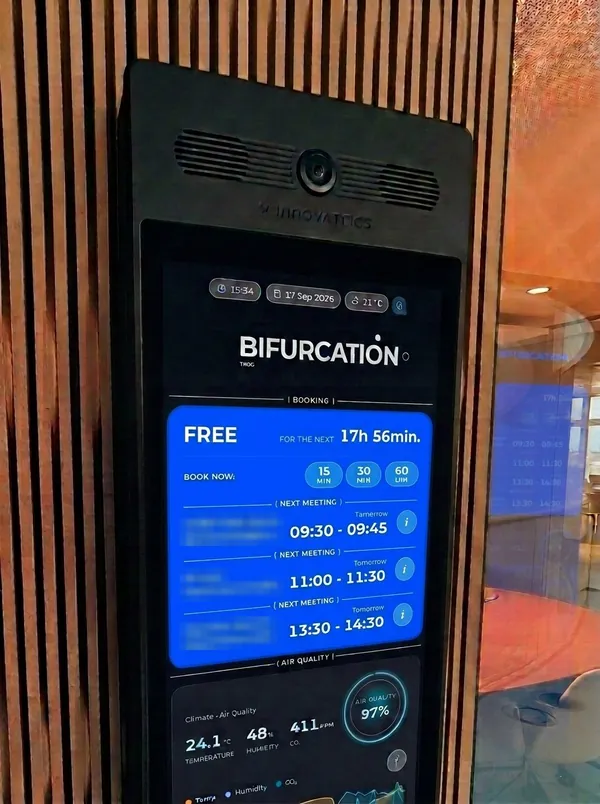
Room Controller of the Bifurcation meeting room at Biometrics House, showing the room as free, the book-now buttons, the next meetings and the air quality
Meeting room Free Book now · 15 / 30 / 60 min
The Bifurcation room at Biometrics House, Bratislava. Organisers blurred.
At a glance

Rooms that book themselves, and free themselves.

01

Free or busy, from across the floor

Blue when the room is free, red when it is taken — readable before you walk over.

02

Book in one tap

Step up, and once the panel recognises you, grab the room for 15, 30 or 60 minutes right at the door. A length that would run into the next booking is greyed out.

03

Walk in, the room is yours

The room’s cameras see you come in and book it within a minute, for as long as you stay, up to the next booking.

04

No-shows released

If nobody turns up, the room is released and goes back on the calendar. At Biometrics House that happens after 15 empty minutes, for bookings longer than half an hour.

Colour coding

Need a room for a call? See it from the corridor.

You don’t walk from door to door. Each panel glows in the state of its room — blue when it is free, red when it is taken — so you spot a free room from the other end of the floor.
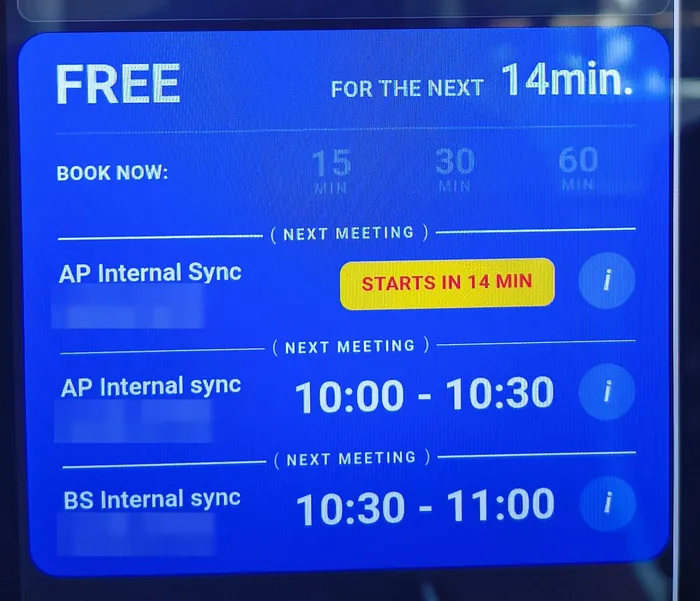
Room Controller in blue: FREE for the next 14 min, the book-now buttons, and the next three meetings, the first with a Starts in 14 min badge
Blue · freeHow long the room stays free, the book-now buttons and the meetings coming up.
Room Controller in red: OCCUPIED for the next 1 min, the ad-hoc meeting in progress with a time bar, buttons to extend by 15, 30 or 60 minutes, and the next meetings
Red · occupiedThe meeting in progress, when the room frees up, and, where the panel is set up for it, +15 / +30 / +60 to extend it, as far as the next booking allows.

Your coloursWe can change both colours to match your brand or building. Photos: the Bifurcation room at Biometrics House, organiser names blurred.

Ad-hoc meetings

No panel tapping. Walk in, and it’s booked.

An empty room books itself within a minute of someone walking in, and adds the colleagues its cameras recognise. The booking runs while they stay, up to the next meeting. A few minutes after they leave, the room is free again — and the calendar says so.

  • Who was there

    Colleagues the cameras recognise are added to the ad-hoc booking, so its details on the panel show who came in.

  • Back in the calendar

    Ad-hoc meetings show up in the room’s calendar, so everyone sees the real state.

  • Released when you leave

    A walk-in booking ends a few minutes after the last person leaves, and a booking nobody turns up to is released after the grace time.
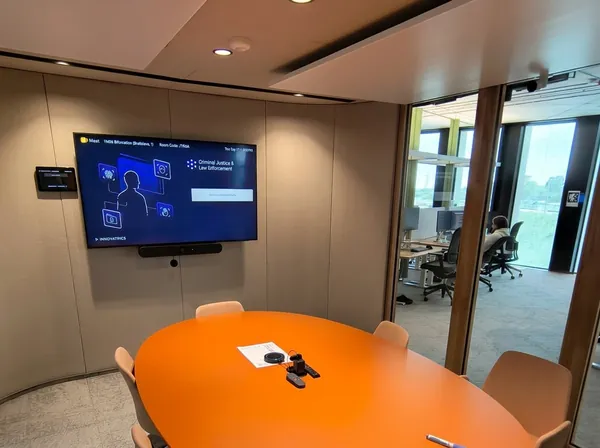
Meeting room at Biometrics House with an orange table and a wall screen
A meeting room at Biometrics House.
Room control

Lights, blinds and air quality — on the panel.

The same panel runs the room: light scenes, blinds and roller shades, and recording — and it shows the air quality.

Light scenes
  • Off
  • Dim light
  • Full light
  • Auto
  • Blinds and roller shades

    Shades open, half way or closed, and blinds tilted or left on Auto — without hunting for a switch.

  • Air quality

    Temperature, humidity and CO₂, with an air-quality score — so you know when the room needs fresh air.

  • Recording widget

    Works with the microphone in the room: turns red while the meeting is recorded, and pauses the recording or mutes the microphone.
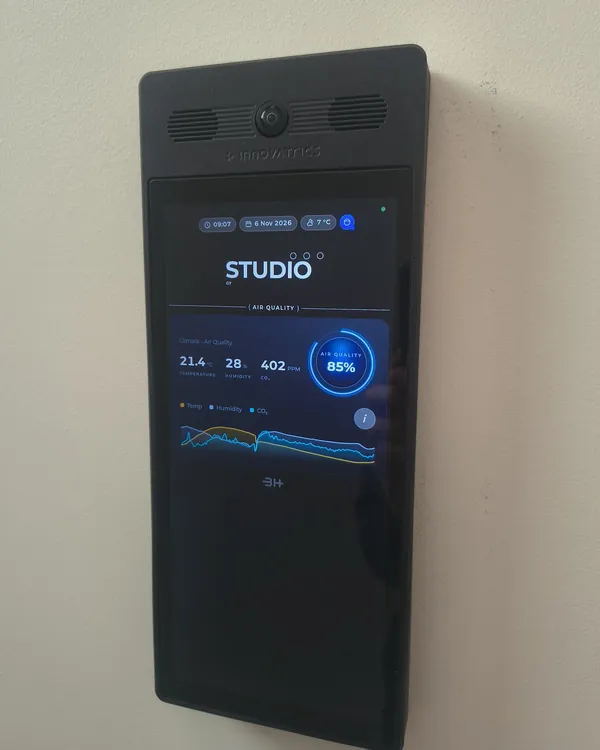
Room Controller beside the Studio room showing temperature, humidity, CO2 and an 85 % air-quality score
Air quality on the panel of the Studio room at Biometrics House.
Help in the room

Need IT, reception or cleaning? Call them from the panel.

Once the panel recognises you, one tap calls IT, reception or cleaning to the room. An ITO support call lands in Google Chat with your name and the room — no describing where you are — and IT answers in the same thread.

  • IT support

    Tap ITO support when the video-call tablet is stuck on loading, or the screen won’t wake up.

  • Reception

    Tap Reception call when the whiteboard marker is missing just as the workshop starts.

  • Cleaning

    Call cleaning when coffee is spilled on the table before the next meeting walks in.
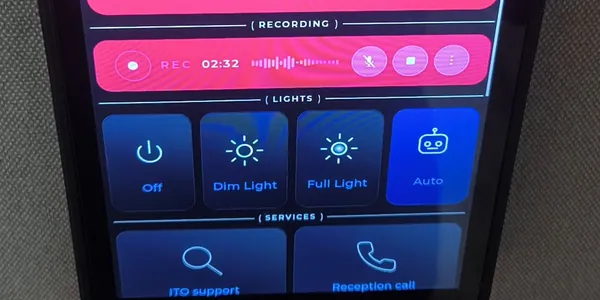
The lower part of the Room Controller: the red recording widget, light scenes Off, Dim Light, Full Light and Auto, and a Services row with ITO support and Reception call buttons
The Services row on the panel: ITO support and Reception call.
The Meeting Room Issues space in Google Chat: the MR app posts that a person calls for ITO help in a room, the caller writes that the Google Meet tablet is stuck on loading, and IT replies Fixed both
The Meeting Room Issues space in Google Chat at Biometrics House: who called, from which room, and IT closing it in the thread. Names and faces blurred.
Personalised

Step up, tap the face icon, and it says hello.

Every panel in the building recognises the person in front of it. Tap the face icon and it shows what is theirs: today, their lockers and where each one is. The same identity that opens the doors drives the content.
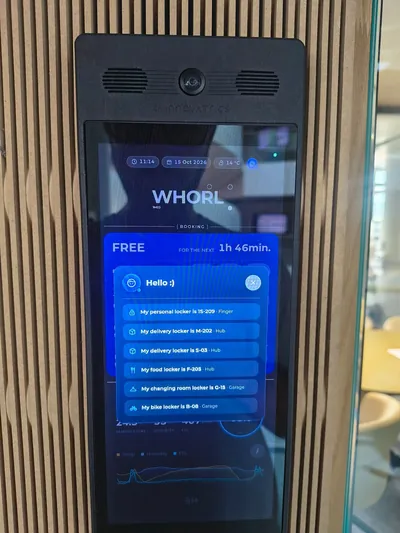
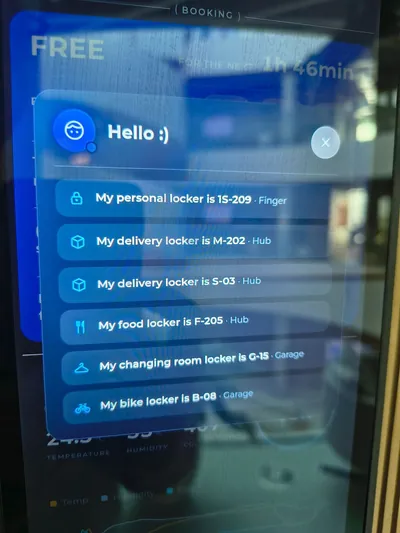
  • Your personal, delivery, food, changing-room and bike lockers
  • Where each locker is
  • Shown only while it recognises you
Room Controller on a wood-slat wall greeting a recognised person with Hello and a list of their lockers Close-up of the panel: my personal locker, two delivery lockers, my food locker, my changing room locker and my bike locker, each with its number and where it is
Meeting minutes · optional

Minutes, without pressing start.

In rooms with a microphone, recording starts by itself when the room’s booking starts — booked ahead, on the panel, or by the cameras as you walk in. No attendee hardware, no app. Afterwards AI writes the transcript and a summary for the participants.

  • Recording you can see

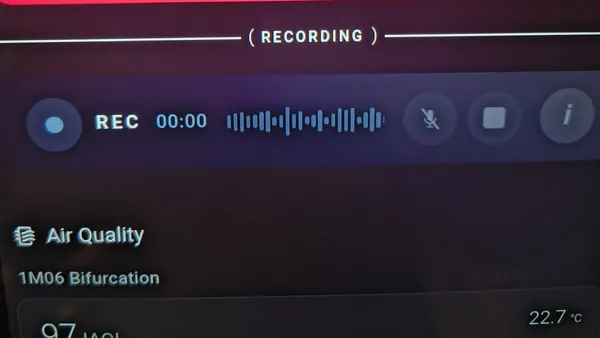
    The recording widget on the panel turns red, with a running timer. Pause the recording or mute the microphone right there; End now ends the meeting and the recording.

  • Take it back

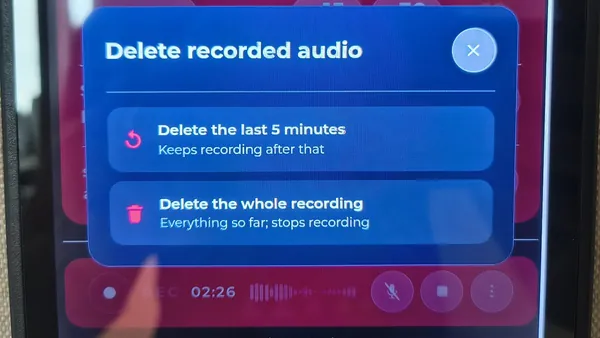
    Said something that should not be in the notes? Delete the last five minutes and keep recording — or delete the whole recording.

  • For the participants

    A microphone in the room records it, and AI writes the transcript and the summary. They go to the meeting’s participants: the people invited in the calendar or, at a walk-in meeting, the colleagues the cameras recognised.

  • Private when you need it

    Put “(Private)” in the meeting title and the meeting is not recorded.
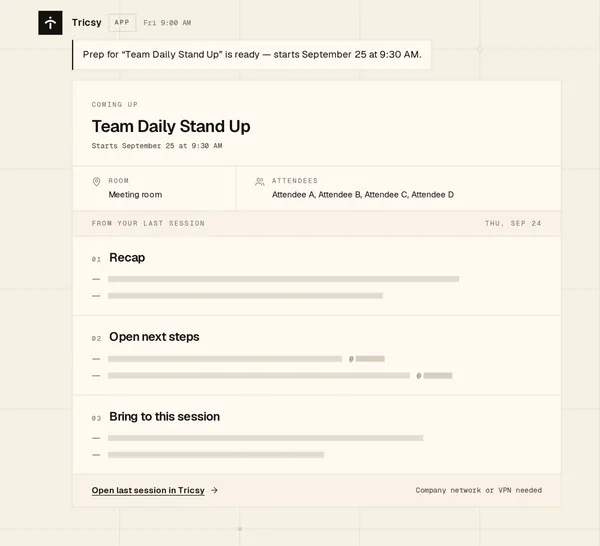
Example of the prep in Google Chat before a recurring meeting: Team Daily Stand Up, with a recap of the last session, open next steps and what to bring
Prep for a recurring meeting, written from the last session. Content anonymised.
Recording widget on the room panel, ready: a dark bar with REC 00:00, a waveform, and mute, pause and info buttons
01 · ReadyThe widget waits, dark, until the meeting starts.
Recording widget turned red: REC 00:06, a waveform, and mute, pause and info buttons
02 · RecordingRed, with the recorded time — nobody has to wonder.
Delete recorded audio dialog on the panel with two options: delete the last 5 minutes and keep recording, or delete the whole recording
03 · Take it backDelete the last five minutes, or the whole recording.
The room itself

For the rooms you have, capsules included.

Tricsy runs in the meeting rooms you already have, built-in rooms and modular capsules alike — like this one at Biometrics House, with the controller beside its door.

Modular meeting capsule with curved slatted walls and a glass front with a door, the controller beside it, in the Biometrics House office
A modular capsule at Biometrics House.
The device

An edge device: it sees, recognises and reports.

Face recognition runs on the controller itself. It evaluates the face like a sensor and sends your server only the result — who, where, when — with a small crop of the face. The controller sends no video.

  • Recognition on the device

    An Android set-top box from Stino inside the controller runs the face recognition.

  • Speakers for announcements

    The two speakers can play building announcements, not only the room’s own sounds.

  • Can open the door

    Through your access control system, a 2N intercom, or a network relay (dry contact) where the door has no access control — for rooms that stay locked.

Display
Touch screen, vertical
Camera
Built into the frame, above the screen
Audio
Two speakers · a separate microphone in rooms set up for minutes
Compute
Android set-top box (Stino) · face recognition on the device
Widgets
Rendered with Home Assistant, so lights, blinds and sensors plug in
To the server
Events and small face crops — no video
Calendar
Google Calendar · Microsoft Outlook planned
Mounting
On the wall beside the door, or flush in the wall

The same unit as the head of the Tricsy Access Totem.

Demo film

Filmed at Biometrics House, our headquarters.

Smart displays · 0:36 Personal dashboard on the panel
Works with

Fits the systems you already run.

The controller reads the room calendar — Google Calendar today; Microsoft Outlook is planned. Its widgets are rendered with Home Assistant, which connects the lights, blinds and sensors. And it uses the same identity as your doors.

  • Google Calendar
  • Microsoft Outlook · planned
  • Home Assistant · widgets
  • Access Totem
  • Your access control
Live in Bratislava

See it in a real meeting room.

Meeting rooms at Biometrics House, our headquarters, run on it — come and walk into one.